.png&w=384&q=75&dpl=dpl_5ox9vYPsykoJqzKyYhbc7G8fd9yW)
Collecting hiring manager feedback is often the slowest step in a hiring process. The recruiter sends an email, waits, follows up on chat and ends up pasting the opinion into the ATS by hand. With Selenios, you request it from the candidate profile, and the reviewer answers by email, Slack or Microsoft Teams without creating an account. The rating flows back to the profile as a note with stars, a recommendation and a comment.
That changes two things. Hiring managers evaluate where they already work, in a couple of minutes. And you stop chasing scattered replies: everything is recorded on the candidate, per position, with a status that tells you who answered and who did not.
Key Takeaway
Hiring manager feedback no longer lives in loose emails and chats. Selenios sends the request, the reviewer answers without an account, and the answer lands on the candidate profile.
Why does hiring manager feedback stall?
The problem is rarely the hiring manager's willingness. It is friction: another platform, another login, a profile they cannot find. When giving feedback means opening a system they use twice a month, it gets pushed to tomorrow.
On the other side, the recruiter collects opinions in different formats (a chat message, a voice note, a "looked good" in the hallway) and has no way to compare them. Meanwhile, the candidate waits.
| Without Selenios | With Selenios |
|---|---|
| Email with the resume attached, manual follow-up | Request from the profile, with a status per reviewer |
| The reviewer needs ATS access | They answer on Slack or with a personal link, no account |
| The full resume goes out, contact details included | You choose what they see: summary, resume, report or interview video |
| Opinions in different formats | A 1-5 rating, a recommendation and a comment |
| Copying the answer into the system by hand | A rated note on the profile and an updated average |
How do you request a rating in Selenios?
There are three starting points, and all three open the same flow.
1. From the candidate profile
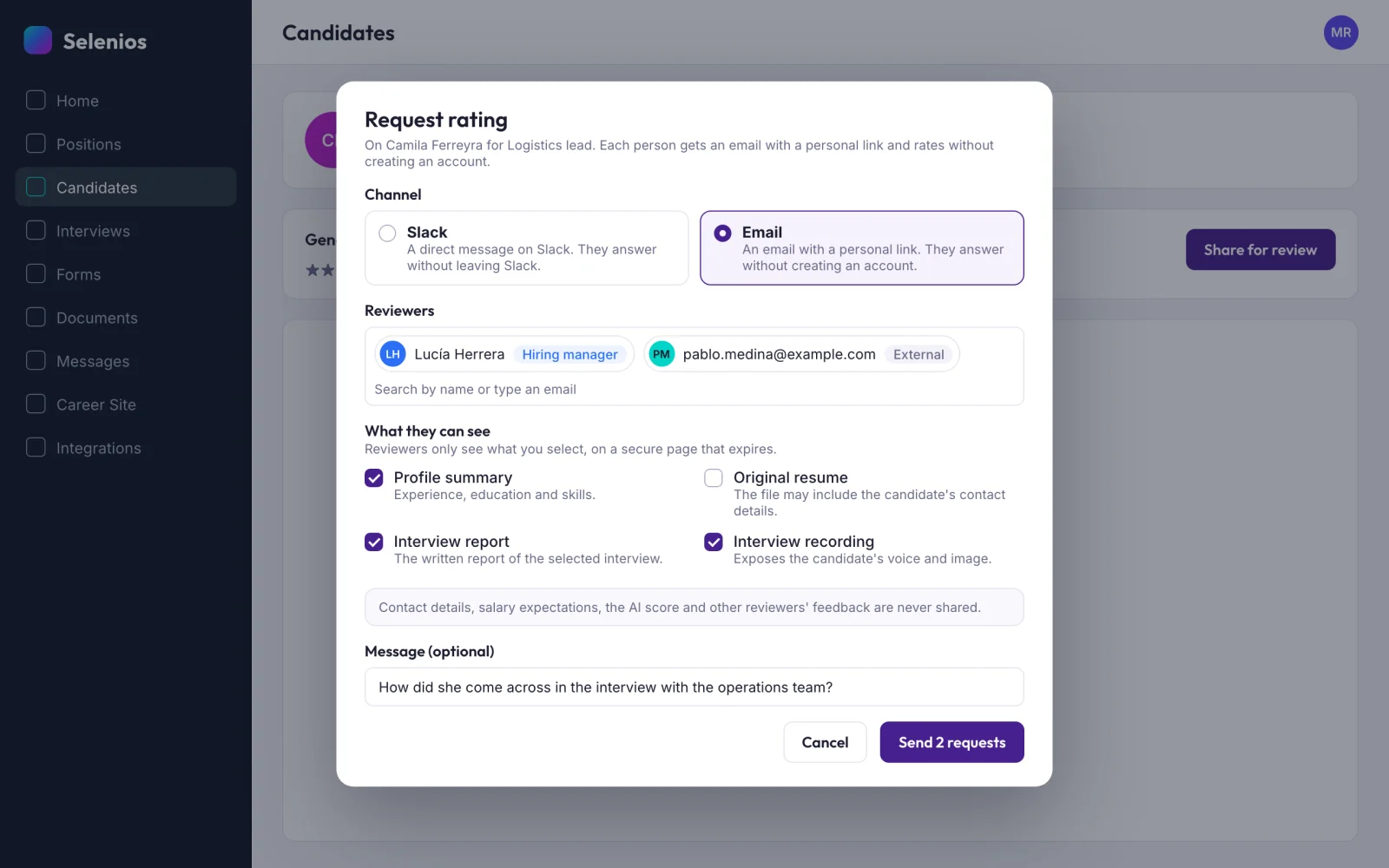
On the profile's rating card, the "Share for review" button opens the "Request rating" dialog. There you choose the channel, the reviewers and what they can see.
2. From an interview's detail
If you just reviewed an interview, "Share interview" opens the same dialog with that interview already selected, so you can share its report and recording.
3. Automatically, with a stage agent
More on this below: when a candidate enters a stage, Selenios sends the request without anyone triggering it.
Who can you ask for feedback?
On Slack, members of your company's workspace, up to 10 people per request. By email, hiring managers of the position or any address: people outside the hiring team are tagged "External". None of them need a Selenios account.
What does the reviewer see, and what is never shared?
Under "What they can see" you check exactly what each reviewer gets:
- Profile summary: experience, education and skills.
- Original resume: the file itself, which may include contact details.
- Interview report: the written report of the selected interview.
- Interview recording: as a short summary video with the key moments in a few minutes, or as the Full recording.
You can also add an optional message, for example what you want them to pay attention to.
Some data never leaves, whatever you select. In the dialog's own words: "Contact details, salary expectations, the AI score and other reviewers' feedback are never shared." The one exception is the original resume: if you share it, any contact details in the file go with it.
Key Takeaway
You share just enough to evaluate. Reviewers do not see salary expectations, the AI score or what others said, so their opinion stays their own.
How does candidate evaluation in Slack work?
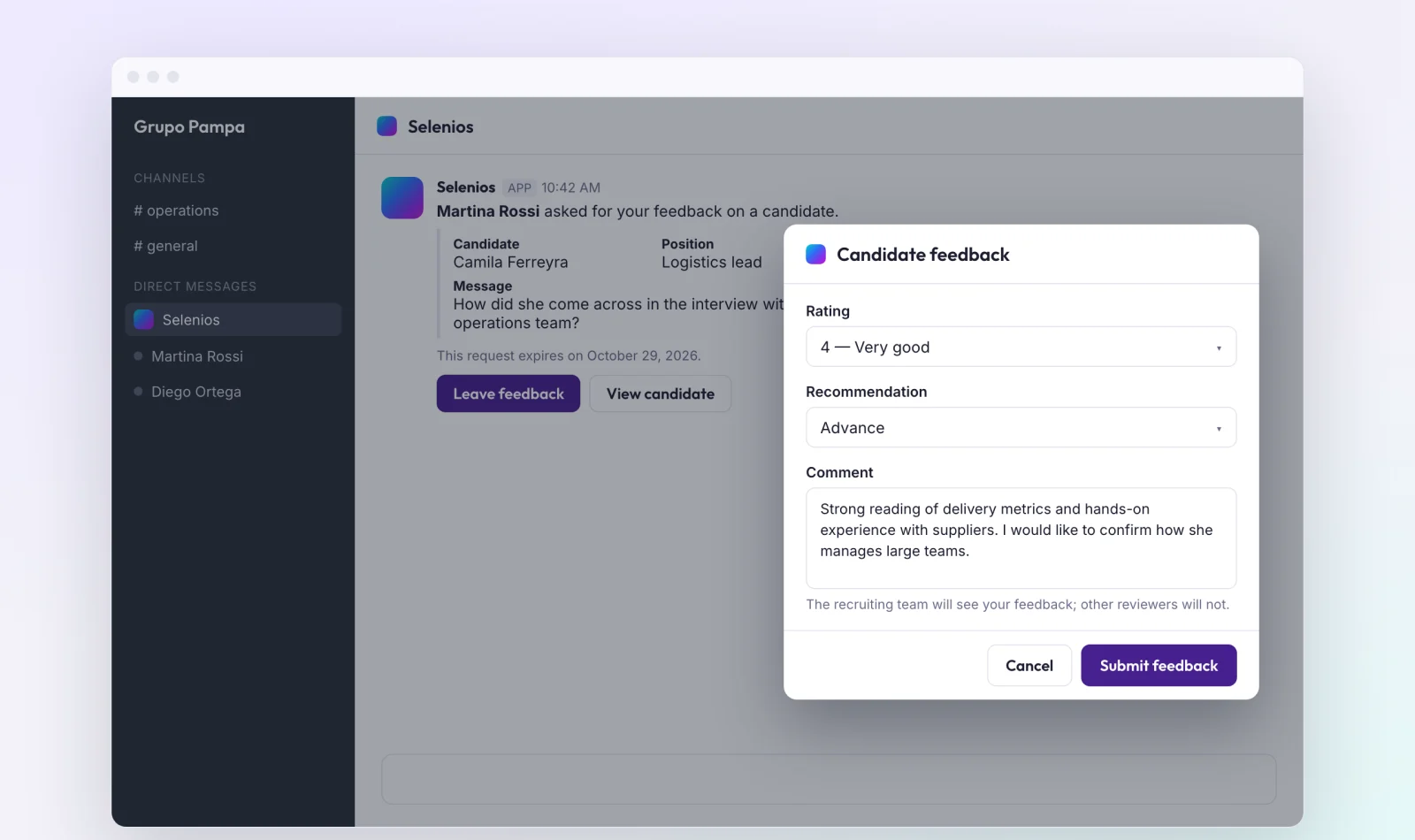
The reviewer gets a direct message from Selenios with the candidate, the position, your message and the expiry date, plus two buttons: "Leave feedback" and "View candidate".
"View candidate" opens the shared profile. "Leave feedback" opens a form inside Slack with a rating, a recommendation and a comment. They answer without leaving Slack and without logging in, and the message updates with their answer.
If your team already runs hiring on Slack, this builds on what we covered in collaborative hiring in Slack: besides hearing about what happens, the team now evaluates right there.
What if the hiring manager does not use Slack? Feedback by email
By email, every reviewer gets a personal link. There is no username or password: they open the link and see a secure page with the profile, an "Open resume" button, the interview report and the video with chapters under "Moments in this video", so they can jump straight to the part that matters.
The page carries a "Shared with" watermark with the reviewer's name, and shows the deadline to answer.
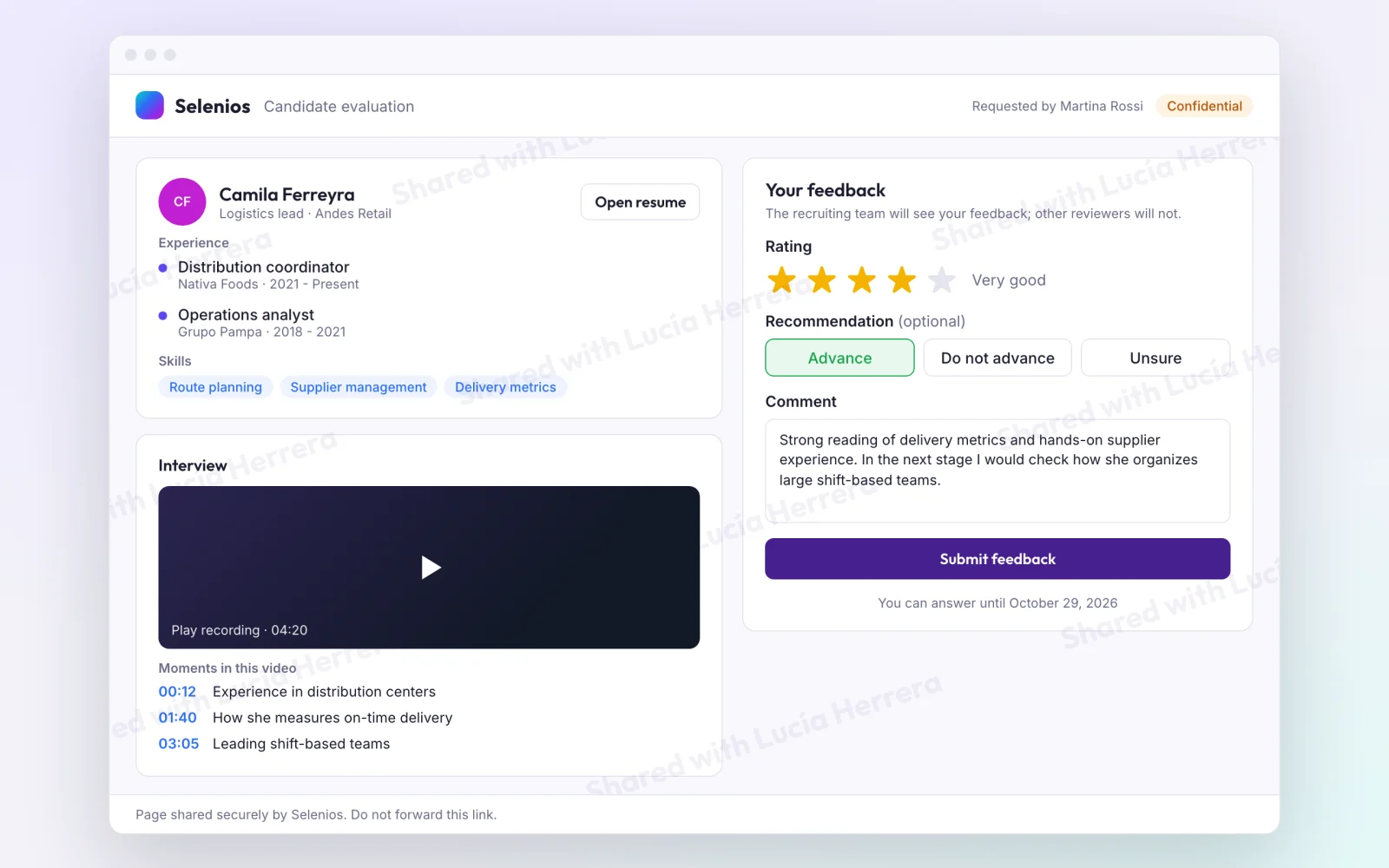
The "Your feedback" form has three parts:
- Rating, from 1 to 5 stars: Poor, Fair, Good, Very good or Excellent.
- Recommendation (optional): Advance, Do not advance or Unsure.
- Comment, required, up to 3000 characters.
"Submit feedback" and they are done. The form says it plainly: "The recruiting team will see your feedback; other reviewers will not."
Email requests send one automatic reminder after 24 hours if there is no answer yet. And email reviewers can edit their rating with the same link until the request expires.
Where does the answer show up?
On the candidate profile, with no manual steps:
- A rated note in the candidate's notes, with the channel ("Via Slack" or "Via Email") and the recommendation: "Recommends advancing", "Does not recommend advancing" or "Unsure".
- The position's rating average updates.
- You get an in-platform notification when someone answers.
Under "Rating requests" you track each request by status: Sent, Answered, Cancelled, Expired, Reminder sent or Not delivered. Each person rates once per candidate and position, so the average reflects different opinions, not the same one repeated.
Key Takeaway
The answer reaches the profile as a note with stars, channel and recommendation. Nothing to copy by hand, and you can see at a glance who answered.
How do you automate the request with a stage agent?
Stage agents run actions when a candidate enters a pipeline stage. One of them is requesting a rating: Selenios sends the request to the position's hiring managers, all of them or a selection, plus any outside emails you add.
If you choose "All hiring managers of the vacancy", the request also reaches anyone assigned to the position later. As soon as one person in the group rates, reminders stop for the rest. In the pending list, these requests carry the "Automatic" badge.
You can set up the agent from its configuration or describe it in plain language, for example: "when a candidate enters the Hiring team interview stage, ask the position's hiring managers for a rating." To see what else agents can do, read our overview of autonomous AI recruiting agents.
Key Takeaway
With a stage agent, the feedback request goes out at the right moment in the process, and stops for the group as soon as someone answers.
Where is it available?
Email feedback is available to every company. Slack works once you connect the integration from Integrations. Automatic requests from a stage agent and from an interview's detail are available too.
To measure the impact on your process, pair it with hiring quality KPIs and with interview documentation and transcription, which produces the report and video you then share.
Frequently asked questions
Does a hiring manager need a Selenios account to leave feedback?+
No. On Slack they answer from a direct message, through a form that opens inside Slack, without logging in. By email they get a personal link and rate on a secure page, without creating an account.
What candidate information does the reviewer see?+
Only what you choose to share: the profile summary, the original resume, the interview report and the interview recording (a summary video or the full recording). Salary expectations, the AI score and other reviewers' feedback are never shared, and neither are contact details, except those that appear in the original resume if you choose to share it.
Which channels can I use to request hiring manager feedback?+
The channels are email, Slack and Microsoft Teams. Email works for every company, and Slack works once the integration is connected from Integrations.
How long does a reviewer have to answer?+
Every request expires after 7 days. Email requests send one automatic reminder after 24 hours, and email reviewers can edit their rating with the same link until the request expires.
Can I request feedback automatically when a candidate moves to a new stage?+
Yes. A stage agent can send the rating request to the position's hiring managers, all of them or a selection, plus outside emails, when a candidate enters a stage. If you choose all hiring managers of the position, people assigned later also receive it.