.png&w=384&q=75&dpl=dpl_CnZZbYB8DtuCCsexcYCQroiCsufu)
The Selenios MCP for recruiting connects your AI assistant to the real data behind your hiring processes. If you use Claude, ChatGPT or another assistant that supports MCP connectors, you can now ask it in plain language about your candidates, interviews, positions and metrics, and have it take action in Selenios, always as you and with your permissions.
Until now, using an AI assistant for recruiting meant copy and paste. You exported a list, pasted a resume, described the position from memory. The answers were decent, but they had no real context and the assistant could not do anything in your system. With the MCP, the assistant queries Selenios directly and you keep working inside the conversation.
Key Takeaway
The Selenios MCP turns your AI assistant into another interface to the platform: it asks about and acts on your real recruiting data, as your user and with your permissions, without exporting or pasting anything by hand.
What is the Selenios MCP and what can your assistant do with it?
MCP (Model Context Protocol) is an open standard that lets AI assistants connect to external tools. Selenios runs an MCP server with tools built for a talent team's daily work, and the assistant picks the right one based on what you ask.
To look things up:
- Search candidates by text, semantic search or plain language, by email, LinkedIn or name, and by stage.
- See a position's candidates sorted by AI score, with the per-criterion breakdown and knockout requirements.
- Open a candidate's full profile, with a link to the resume, and their application form answers.
- Read meetings, speaker-attributed interview transcripts and interview reports.
- Search for a keyword across every interview transcript at once.
- See the result and evaluation of the AI interview.
- Check positions, job descriptions, pipelines, average days per stage, screening setup and organization KPIs.
- Review contact templates, rejection reasons and candidate email replies you have not read yet.
To take action:
- Tag candidates, add notes, send an email with free text or a template, move stages, reject, and re-score a candidate against a position.
- Generate an AI draft of a job posting, create or update job descriptions, change status, set a closing date, configure multiposting and recalculate scores.
- Add and reorder pipeline stages, edit screening questions and form fields, and choose whether the Career Site shows the salary range.
| Task | Without MCP | With the Selenios MCP |
|---|---|---|
| Build a shortlist | Export, filter and paste into the chat | Ask for the top candidates and get real scores |
| Find who mentioned a topic | Reread transcripts one by one | One search across every interview |
| Move candidates and notify them | Open each profile and send each email | One instruction in the conversation |
| Create a position | Write, copy and configure by hand | AI draft and creation from the chat |
Key Takeaway
The assistant does more than read: it runs pipeline and position actions too. Every write goes through the same business rules and integrations as if you did it in the interface.
How do you connect Claude or ChatGPT to Selenios?
Each person connects once, with no API keys. You authorize with your Selenios account and the assistant works on your behalf. On business plans, such as ChatGPT Business or Enterprise and Claude Team or Enterprise, a workspace admin first has to add or enable custom connectors; after that, each person connects their own account.
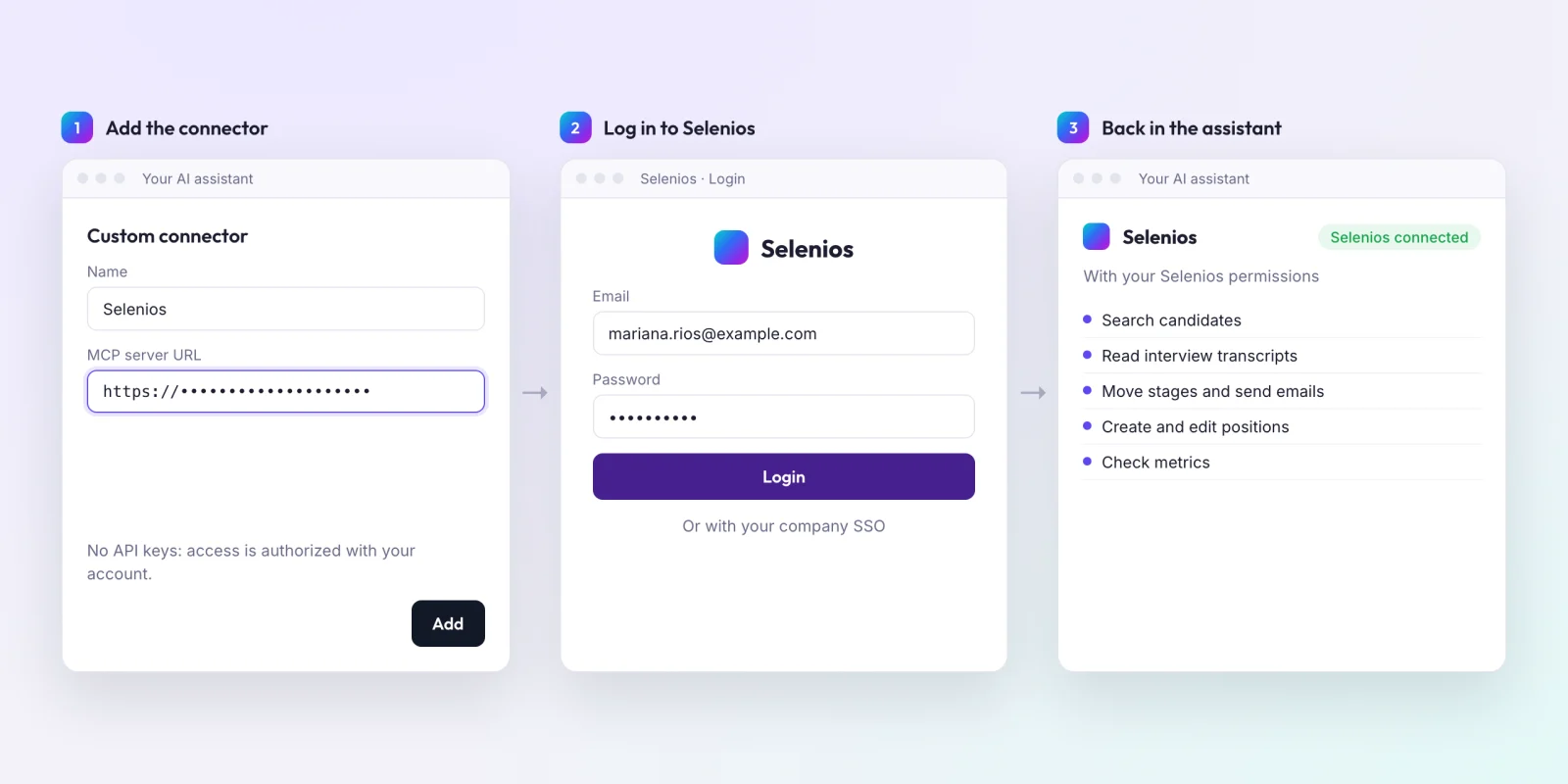
1. Add Selenios as a custom connector
In your assistant, find the option to add a custom connector (or MCP connector) and enter the Selenios MCP server URL, which your Selenios contact provides.
2. Log in with your Selenios account
The assistant opens the Selenios login screen in your browser. Sign in with your usual account or your company SSO and click "Login".
3. Return to the assistant and start asking
When you finish, you are back in the conversation with Selenios connected. From then on, the assistant can use the tools your role has access to.
Key Takeaway
Connecting your assistant to Selenios takes three steps: add the MCP server URL, log in with your account, and return to the conversation. No API keys and no shared credentials.
Which prompts can you use? Examples by use case
There are no commands to learn. Talk to the assistant like a colleague who has Selenios open. Copy and adapt these examples.
Sourcing and shortlists
- "Show me the top 5 candidates for Accounting analyst and why."
- "Find candidates with last-mile logistics experience and advanced English."
- "Why does Joaquín Medina have an 87? Show me the per-criterion breakdown and whether he failed any knockout."
- "What did Camila Ferreyra answer in the application form?"
For more on semantic search across your database, read AI search across your candidate database.
Interviews
- "Who mentioned SAP experience in this week's interviews?"
- "Which interview covered salary?"
- "Summarize the interview report for Florencia Acosta."
- "How did Diego Villalba do in the AI interview?"
Pipeline actions
- "Move everyone above 80 to interview and send them the invitation template."
- "Tag Camila Ferreyra as a finalist and add a note with the highlights from the report."
- "Which candidates replied by email that I have not read yet?"
- "Re-score Renata Quiroga against the Store manager position."
Creating positions
- "Draft a Store manager position in Córdoba."
- "Create it with a November 30 closing date and configure multiposting."
- "Add a Management interview stage after Technical interview."
- "Add a question to the form about availability to work weekends."
Metrics
- "How many days does the technical interview stage take on average?"
- "Give me the organization KPIs."
- "How many candidates are in each stage of the Account executive position?"
To know what to look for in those numbers, see our guide to recruitment funnel analytics.
Key Takeaway
The best prompts combine reading and acting: first ask for the shortlist or the interview summary, then move stages, send templates or adjust the position in the same conversation.
Is it safe to connect an AI assistant to your recruiting data?
Yes, and it is the part of the design we spent the most care on. The rule is simple: a chat can never do what your user could not do in the interface.
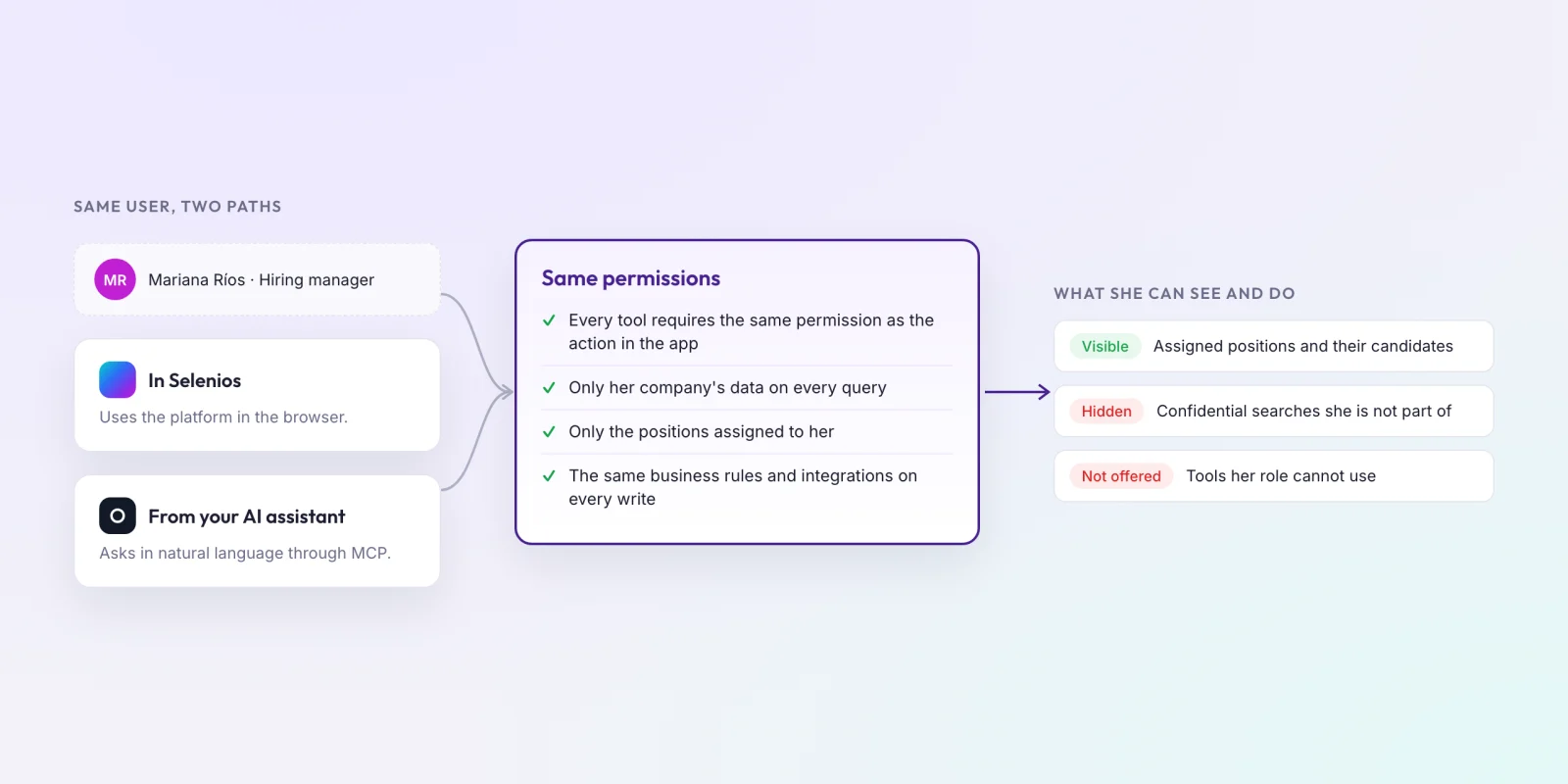
- Same permissions as the app. Every tool requires the same permission as the equivalent action in Selenios. If your role cannot use a tool, it is not even offered to the assistant.
- Company isolation. Every query is limited to your company's data.
- Assigned positions. Hiring managers and restricted roles only see the positions assigned to them.
- Confidential searches. If you are not part of a confidential search, it stays invisible through the assistant too, including its candidates and notes.
- Same rules on writes. Actions run the same business rules and integrations as the interface.
If your company already uses SSO, you may want to read about enterprise SSO in your ATS.
Key Takeaway
The MCP does not open a new door to your data: it is another way to use Selenios with the same user, the same role and the same confidentiality restrictions.
Who can use the Selenios MCP?
The MCP is available to every company that uses Selenios, as part of the product. Each person connects their own assistant with their own account, so a recruiter, a hiring manager and an administrator see different things, just as they do in the app.
For ideas on writing better instructions for an assistant, see our ChatGPT prompts for HR managers.
Frequently asked questions
What is the Selenios MCP?+
It is a Model Context Protocol server that connects AI assistants that support MCP connectors, such as Claude or ChatGPT, to your company's recruiting data in Selenios. You ask in plain language, and the assistant reads and acts in Selenios with your permissions.
How do I connect Claude or ChatGPT to Selenios?+
Add Selenios as a custom connector in your assistant with the Selenios MCP server URL, which your Selenios contact provides, log in with your Selenios account in the browser, and return to the assistant. No API keys are needed.
Can the assistant see or do more than I can in Selenios?+
No. Every tool requires the same permission as the equivalent action in the app, and tools your role cannot use are never offered to the assistant. Hiring managers only see their assigned positions, and confidential searches you are not part of stay invisible.
Which AI assistants can I connect to Selenios?+
Claude, ChatGPT or any other assistant that supports MCP connectors or custom connectors. Each person connects it with their own Selenios account, with no API keys. On business plans, a workspace admin may need to enable custom connectors first.
What actions can the assistant take in Selenios?+
Beyond reading candidates, interviews, positions and metrics, it can tag candidates, add notes, send emails with free text or a template, move stages, reject, re-score candidates, create and edit positions, add pipeline stages and edit screening questions. Every action runs the same business rules as the interface.