.png&w=384&q=75&dpl=dpl_DrQu2GGCGzACoRt7LFzLzAFxuzdd)
Electronic signature with identity verification in Selenios lets you send an offer letter, an employment contract or a confidentiality agreement for signature without leaving the pipeline, and, if you want, ask for an identity check whose result HR can review. It matters because closing a hire is often the most manual part of the process: files going back and forth by email, printing, scanning, and a separate e-signature tool that knows nothing about the candidate.
With the Documents module, it all happens where you evaluated the person. You prepare the document from their profile, the candidate signs it from their phone, and you get the signed PDF with a certificate that records the evidence of every signature.
Key Takeaway
Selenios brings electronic signature into the pipeline: the document is prepared from the candidate profile, identity is verified in about a minute, and the evidence is ready if you ever need it.
What problem does it solve when closing a hire?
Once a candidate accepts an offer, you still need their signature. At many companies that means building the document elsewhere, uploading it to another platform and chasing the status by email, with no simple way to know whether the person who signed is the one who went through the interviews.
| Before | With Selenios |
|---|---|
| The document is built outside the ATS and every detail is copied by hand | Models with fields filled from the candidate and position data |
| A separate signature tool with no hiring context | The signature lives on the candidate profile, before the Hired stage |
| Print, sign, scan | The candidate signs from their phone with a typed name or a drawn signature |
| No certainty about who signs | An email code and, if you ask for it, an ID photo and a face check |
| Evidence scattered across emails | An electronic signature certificate attached to the signed PDF |
How do you prepare a document for signature?
From the candidate profile in the pipeline, click Prepare document. You can choose an offer letter, employment contract, confidentiality agreement, contract addendum, internal policy or another type of document.
There are two ways to build it:
- A model: you edit it like a Word document, with color-coded fields depending on who fills them in: HR, the candidate or the signer. You can also import an existing .docx as a model.
- Your company's PDF: you upload your own file and, if it has fillable fields named like the system variables, Selenios fills them in automatically.
Company signers come from the Authorized signers list that admins define, with 1 to 3 per model. By default the company signs first, though you can have the candidate sign first. To add verification, turn on Ask the candidate for identity verification before sending.
Once sent, the content is frozen. If you need to change a term, you cancel the document and send a new one. Each application can have only one pending document at a time.
Key Takeaway
You build the document from an editable model or your own PDF, only authorized people can sign for the company, and nobody can change the content after it is sent.
How does electronic signature with identity verification work for the candidate?
The candidate receives a link by email and completes everything in the browser, including on a phone. These are the steps:
1. See how it works
The How it works screen shows the steps and the signing order.
2. Confirm their email with a code
They receive a code by email and enter it to confirm they are the person the document was sent to.
3. Verify their identity, if you asked for it
This step appears only when you turned on verification, and only for the candidate. They accept the biometric consent, take or upload a photo of the front of their ID card or passport, and complete the Face check: they center their face in an oval for the liveness check. Their live face is then compared with the photo on the ID. The whole step adds about a minute.
If they cannot complete verification, HR is notified and can resend the document without the verification requirement.
4. Review the document and fill in their details
They read the full document and complete the fields assigned to them, with a hint that shows where each detail lands in the document.
5. Sign or decline
They accept the electronic signature consent and sign with a typed name or a drawn signature. If they disagree, they can decline the document and give a reason.
6. Receive the signed document
Once every party has signed, each one receives the signed PDF and its certificate by email. From the final screen, the candidate can also use Download signed document.
Key Takeaway
For the candidate it takes a few minutes on a phone: confirm the email, verify their identity if asked, review the document and sign. Nothing to print or scan.
What does Selenios check on every signature?
When you asked for identity verification, Selenios checks that the person in front of the camera is the person on the ID and that the name on the ID matches the signer's. If something does not match, signing is not blocked, but HR is notified.
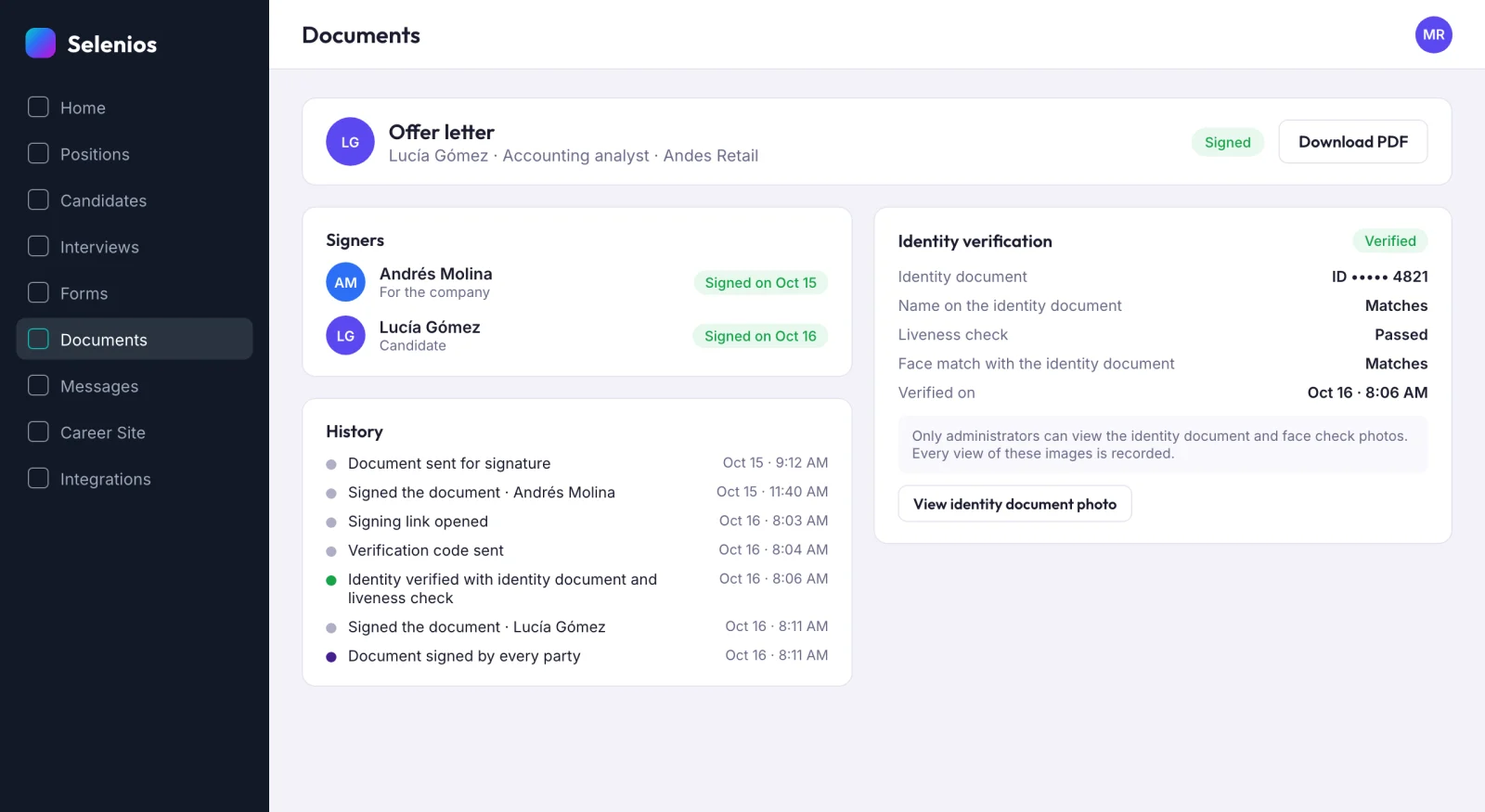
On every signature, even without identity verification, Selenios flags Signals to review when it detects unusual activity. These signals do not invalidate the signature: they give context to decide whether to confirm something with the person through another channel.
Key Takeaway
Signals to review do not stop the hire, but they tell you when a signature deserves a second look.
What evidence goes into the electronic signature certificate?
For every signer, Selenios records the device, where they signed from, the time of verification and signature, the exact consent text accepted, and the exact version of the PDF signed, with a fingerprint that identifies it.
The final PDF includes the document, the signature block and an electronic signature certificate page that cites the country's electronic signature legal framework. When identity verification was used, the certificate adds a section with the masked ID number and the verification result. The file is sealed so any later change is visible.
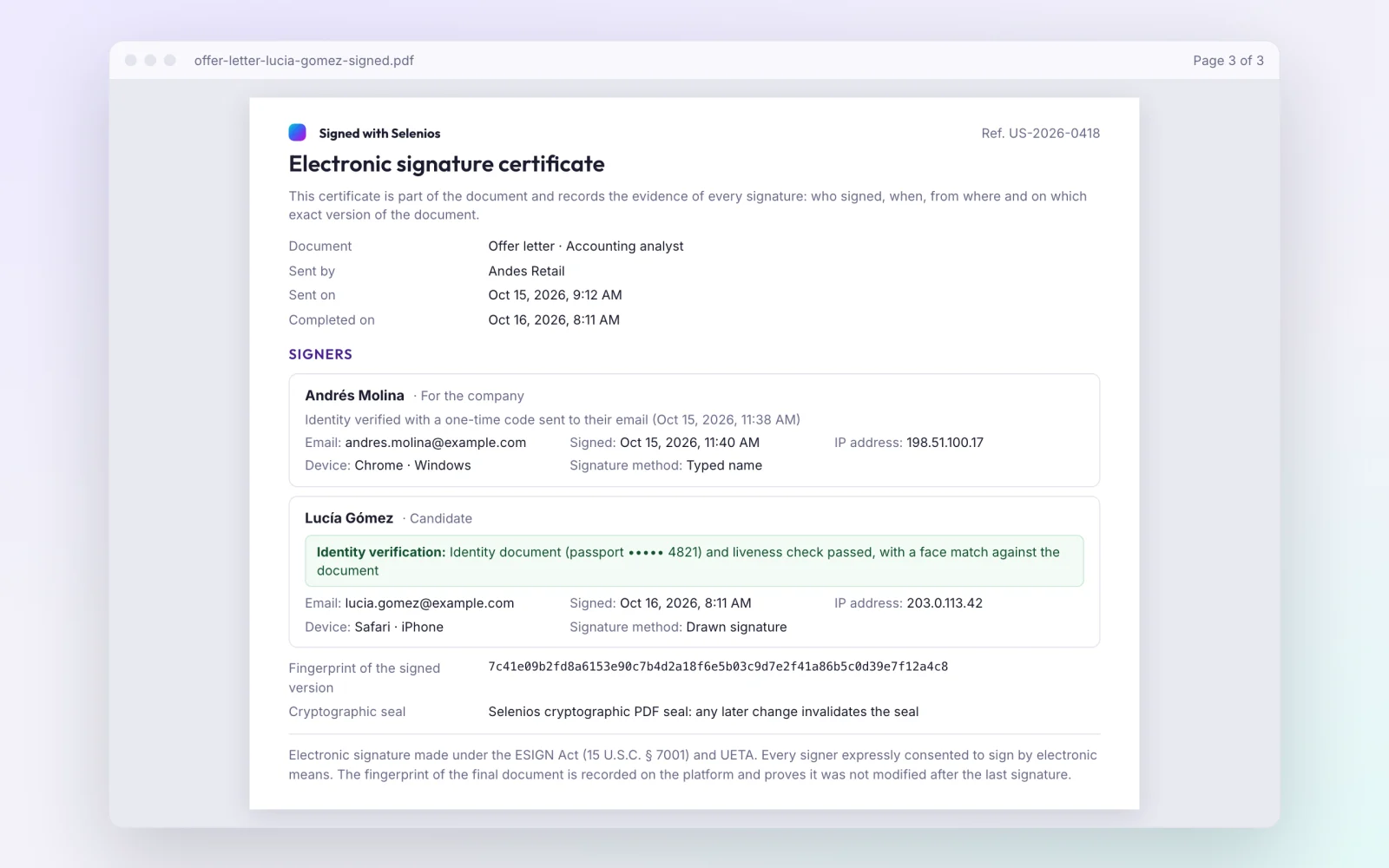
Each document also has an append-only event history, from the moment it is sent until it is signed, declined or expired. ID photos are kept as evidence, only admins can view them, and every view is logged.
Documents, emails and signing pages can be in English, Spanish or Portuguese, and the country sets the legal framework cited, the ID label (such as RUT, CPF or CURP) and the currency. For other legal considerations, see our legal checklist for AI recruitment in Latin America.
Key Takeaway
The certificate puts in the same PDF who signed, when, from where and on which exact version of the document.
How does HR track every document?
The Follow-up tab in the Documents module lists every submission, grouped into Pending signature, Signed, Not completed and All. Each document shows how many parties signed, who is missing, the expiration date and its status: Awaiting signature, Signed, Declined, Expired or Cancelled.
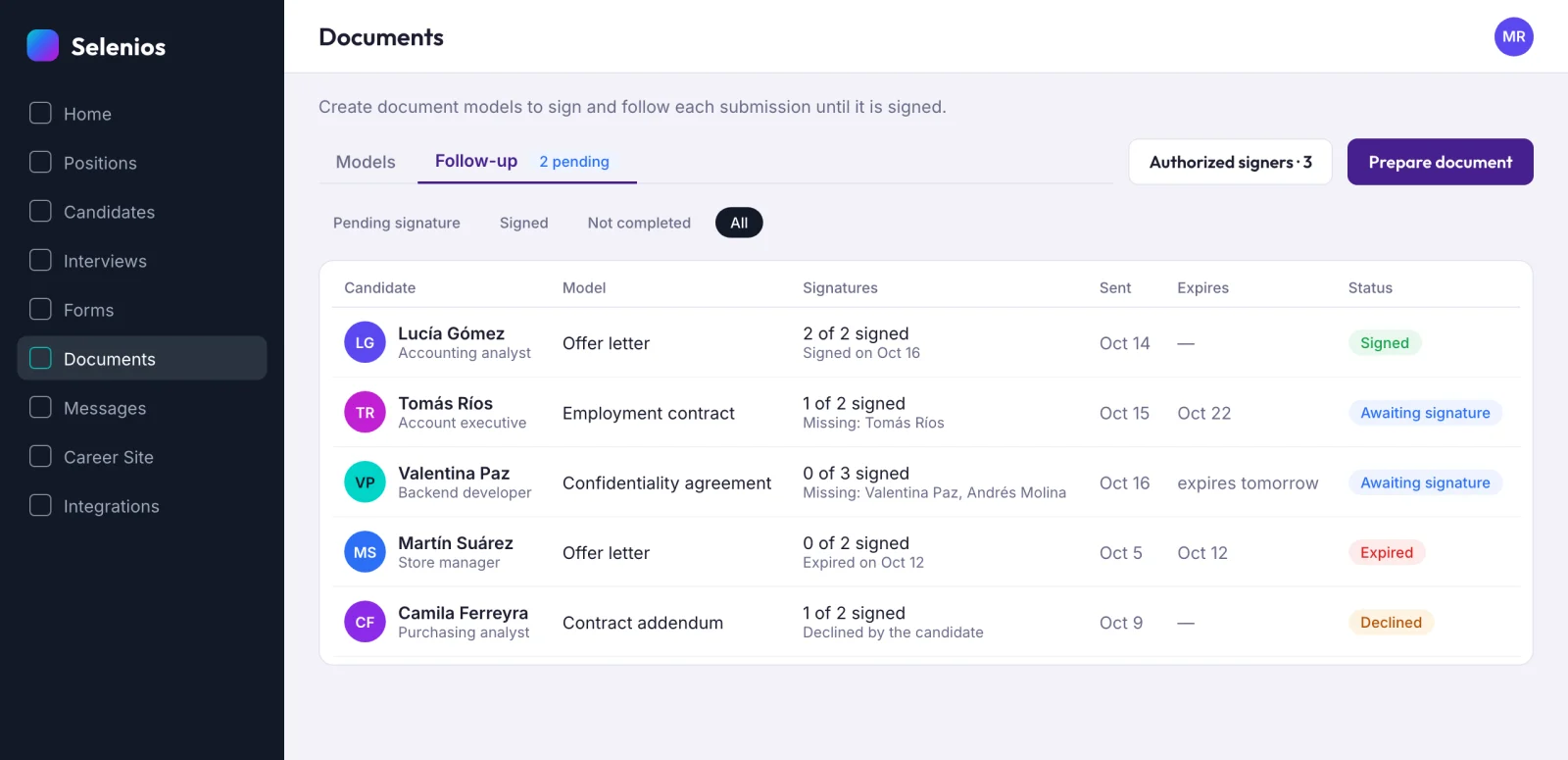
Hiring managers see only the status of documents for their own positions, without access to the content or amounts. And if someone moves a candidate to Hired while the document is unsigned, Selenios shows the warning "The document is not signed yet". You can confirm anyway, but nobody moves forward without knowing.
To look after the last stretch of the candidate experience, see our guide to cNPS and how to automate post-interview follow-up.
Key Takeaway
HR sees in one list which documents are still unsigned, and the pipeline warns before anyone marks a candidate as hired without a signed document.
How do you start using electronic signature in Selenios?
The Documents module and identity verification are two separate options, each enabled for your company. It is enabled per company: ask your Selenios contact or book a demo.
Frequently asked questions
What is electronic signature with identity verification in Selenios?+
It is part of the Documents module and lets you send an offer letter, a contract or another document for signature from the candidate profile. When HR asks for it, the candidate confirms their identity with a photo of the front of their identity document and a face check before signing.
How does Selenios verify the candidate's identity before signing?+
The candidate first confirms their email with a code sent to it. If identity verification was requested, they accept the biometric consent, take or upload a photo of the front of their ID card or passport, and center their face in an oval for the liveness check. Their live face is then compared with the photo on the ID.
What happens if the candidate cannot verify their identity?+
If they do not succeed, HR is notified and can resend the document without the identity verification requirement.
What evidence is recorded for each electronic signature?+
For every signer, Selenios records the device, where they signed from, the time of verification and signature, the exact consent text and a fingerprint of the signed version. The final PDF adds an electronic signature certificate page and is sealed so any later change is visible.
Can I use my company's own PDF contracts?+
Yes. You can upload your own PDF, up to 10 MB and 40 pages. If it has fillable fields named like the system variables, Selenios fills them in automatically.